So assume you want to remove the follow notifications from the forum.
You can do this:
- Go to your notification preferences:
IO Games Forum - The go-to place for all Web Gamers - Scroll down
- Disable the notifications in the follow section:
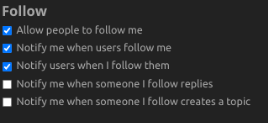
- No more notifications
As my days of being a regular is done for good, I decide to make this simple tutorial, so I don’t have to worry about notifications. I have been way more active in the https://forum.creative.gimkit.com/ forum lately so that is why I have not been active here lately. This guide is also useful to those that want to disable the annoying notifications.
I have made this guide a wiki
Thank you @gautam for allowing members to make their posts wiki